
Did you know that in 2024, automated traffic overtook human visitors for the first time, making up 51% of all web activity?
Even more concerning, 37% of this traffic comes from malicious bots. The rise of generative AI and large language models has made sophisticated attacks easier to deploy at scale. To fight these threats, many organizations use geo-blocking, which restricts traffic from entire countries. But geo-blocking is more than a security measure. It can directly affect SEO, impacting search visibility, indexation, and global authority.
In this guide, you will learn how geo-blocking affects SEO, the risks it introduces, and strategies to protect your site without losing reach or authority.
Understanding the Global Cyber Threat Landscape
To see why some organizations turn to geographic blocking, you first need to understand the scale of today’s cyber threats. The United States remains the most targeted country, reporting over 31,000 cyber incidents in 2025. These attacks are not evenly spread across industries, they focus on sectors where data and transactions are most valuable.
For example, the travel and retail sectors face serious problems with malicious bots. Automated attacks account for 48% of travel site visits and 59% of retail traffic, showing just how pervasive the threat is.
Malicious Bot Traffic by Industry
Below is a table showing the share of “bad bot” traffic in different industries and the most common types of attacks:
| Industry Sector | Bad Bot Traffic Percentage (2024) | Primary Attack Vector |
| Retail | 59% | Price Scraping & Account Takeover |
| Travel | 48% | Inventory Exhaustion & Scraping |
| Financial Services | 30% | Credential Stuffing & Account Takeover |
| Gaming | 57% | In-game Fraud & Botting |
| Healthcare | 32% (Approx.) | Data Theft & PII Scraping |
This table shows that certain industries are far more vulnerable to automated threats than others, which makes protecting your website a high-stakes priority.
The Rising Costs of Cybercrime
The financial consequences are significant. Large businesses report an average cost of $202,700 per cybercrime incident, a 219% increase compared to previous years. Ransomware demands have grown even faster, rising 253% since 2020 and often exceeding $1 million per attack.
With losses this high, the idea of blocking entire geographic regions, especially areas responsible for a large portion of global attacks, like parts of Asia Pacific, can seem like a straightforward defense. While effective in reducing attack volume, it’s a blunt strategy that can carry serious SEO and business consequences.
How Geographic Filtering Works and How Accurate It Is
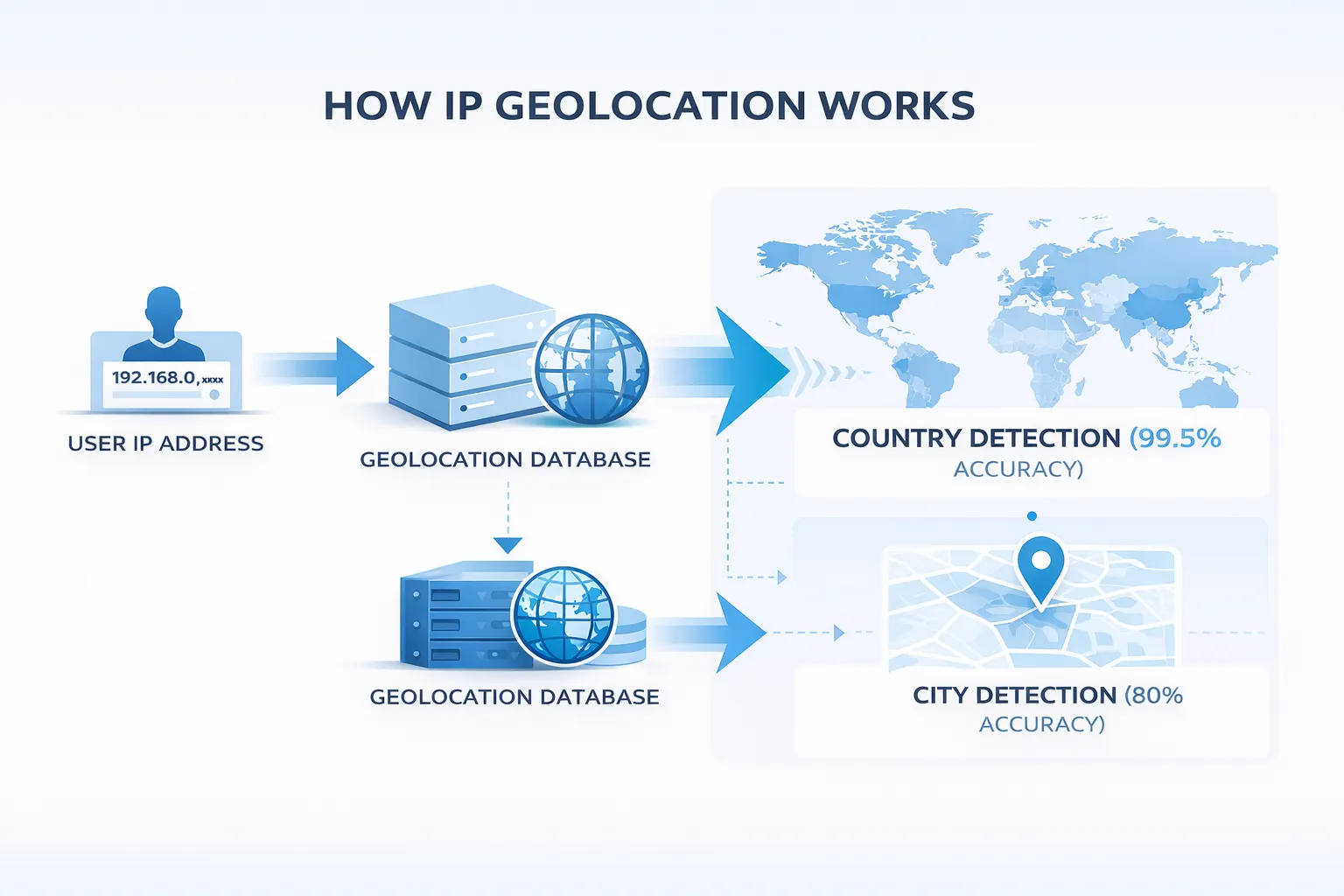
Geographic blocking relies on IP geolocation. This technology maps a visitor’s IP address to a physical location using centralized databases. At the country level, accuracy is very high, often above 99.5%. But as you narrow targeting to regions or cities, accuracy drops to about 80%. This means some legitimate users may be blocked by mistake.
Layers Where Geo-Blocking Is Applied
You can implement geographic restrictions at different levels of your technology stack. Each method has trade-offs in accuracy, server impact, and SEO risk:
| Implementation Method | Accuracy Level | Server Resource Impact | SEO Risk Factor |
| CDN/WAF (Edge) | High | Minimal | Moderate (if bot-aware) |
| Web Server (.htaccess/Nginx) | High | Moderate | Moderate |
| CMS Plugin (WordPress/Shopify) | Variable | High | High |
This table helps you see how each method balances performance and SEO safety. Using a CDN or WAF is usually the most efficient, as it filters traffic before it reaches your server. Server-level rules are effective but consume resources. CMS plugins are easy to manage but risk misconfiguration and can hurt SEO.
The Role of HTTP 451 Status Code
The HTTP 451 status code adds clarity to geo-blocking. Named after Ray Bradbury’s Fahrenheit 451, it signals that a resource is unavailable for legal reasons, such as government censorship or compliance requirements like GDPR. Compared to a generic 403 Forbidden, a 451 code tells search engines why content is blocked.
This helps maintain SEO integrity, though frequent 451 responses can still lead to de-indexing in affected regions.
How Geographic Blocking Affects Your Regional Search Visibility
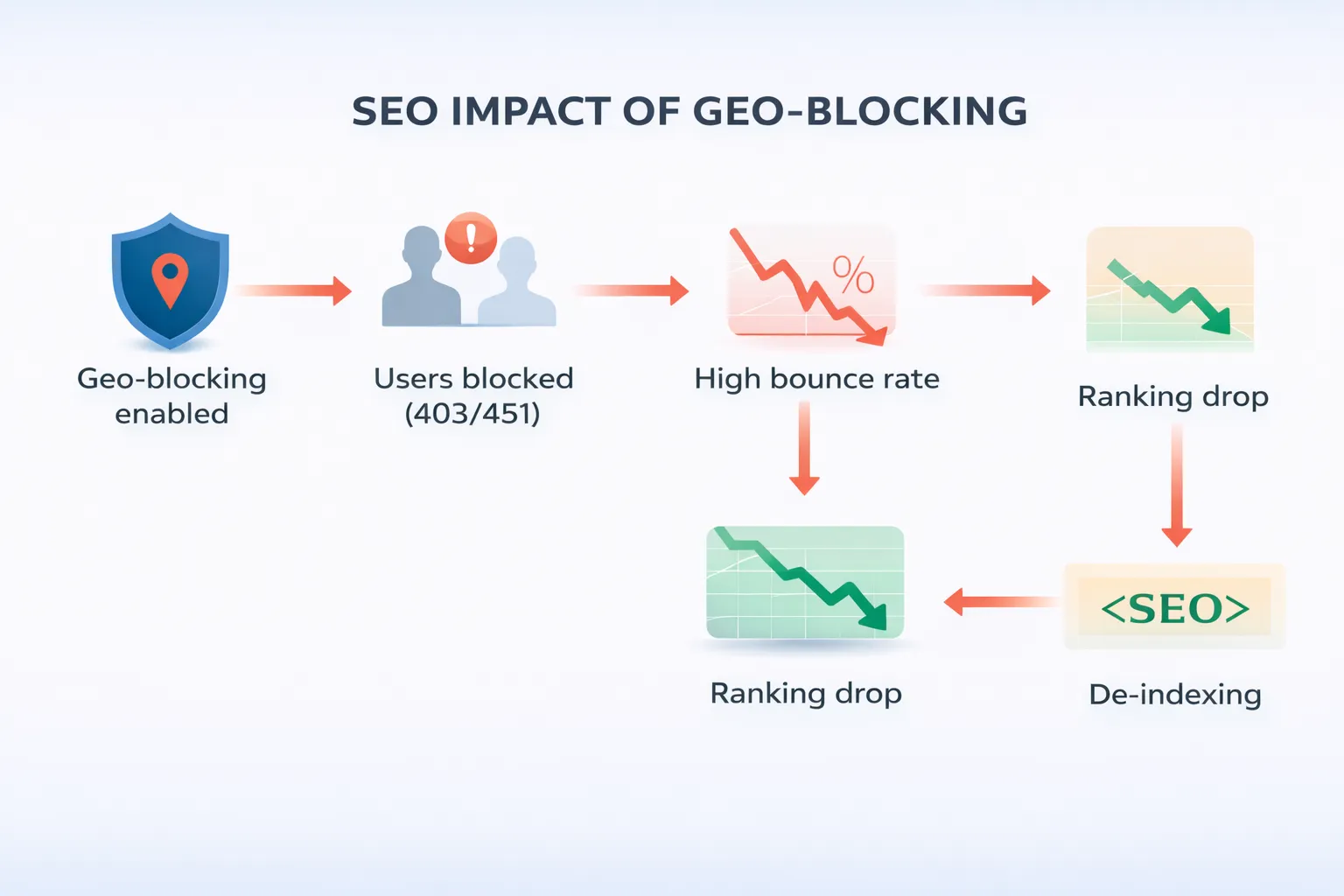
The most immediate impact of geographic blocking is that your website can disappear from search results in the blocked region. Google and other search engines aim to show users content that is accessible and relevant. If users in a blocked country repeatedly hit 403 Forbidden or 451 errors, search engines interpret this as a poor user experience.
High bounce rates, when users leave after viewing just one page, signal that your content is either inaccessible or irrelevant. This leads to a fast drop in regional rankings and can eventually remove your site from the local search index.
The Spillover Effect on Global SEO
Even though search engines try to evaluate performance regionally, blocking can have wider consequences. If your site is unavailable in half of its potential markets, it can hurt your overall domain quality score. Search engines judge authority by global reach, backlinks, and user engagement.
A site invisible to a large portion of the web may struggle to compete for high-authority international keywords. Its opportunities for acquiring organic backlinks shrink, slowing global growth.
Key Metrics Impacted by Regional Blocks
Below is a table summarizing how geo-blocking affects critical SEO and traffic metrics:
| Metric | Impact of Regional Block | Long-term Consequence |
| Regional SERP Ranking | Near-instant drop to zero | De-indexing in the blocked country |
| Bounce Rate | Sharp increase in blocked regions | Negative signals to regional algorithms |
| Organic Traffic | Loss of all visits from blocked IPs | Significant reduction in global top-of-funnel traffic |
| Link Acquisition | Prevention of international backlinks | Slower growth of Domain Authority |
This table shows that while geo-blocking can reduce malicious traffic, it comes at the cost of search visibility, engagement, and authority. Understanding these trade-offs is essential before deciding to block entire regions.
The Googlebot Challenge: How Geo-Blocking Can Affect Crawling
One of the biggest risks of geographic blocking comes from how Google crawls your site. For years, SEOs assumed Googlebot mostly came from U.S.-based IPs, especially in California. Today, that is no longer the case. To support locale-adaptive pages, websites that change content based on visitor location, Google uses geo-distributed crawling.
This means Googlebot can appear to come from IP addresses in different countries. Its job is to check that your localized pages show the correct content and meet regional standards. Google explicitly states: “When Googlebot appears to come from a certain country, treat it like any other user from that country.”
Why Blocking Can Backfire
If your site blocks traffic from a country, and Googlebot tries to crawl from an IP in that region, it will be blocked. This can create a Crawl Anomaly, where Google’s indexing nodes, both in the U.S. and elsewhere, report errors in Google Search Console. Common errors include “Blocked by robots.txt” or “403 Forbidden.”
These errors aren’t just minor issues. If Google detects inconsistent access, it may remove your pages from the search index globally. In other words, blocking regions can unintentionally hurt your visibility worldwide.
Cloaking vs. Geo-Blocking: What You Need to Know
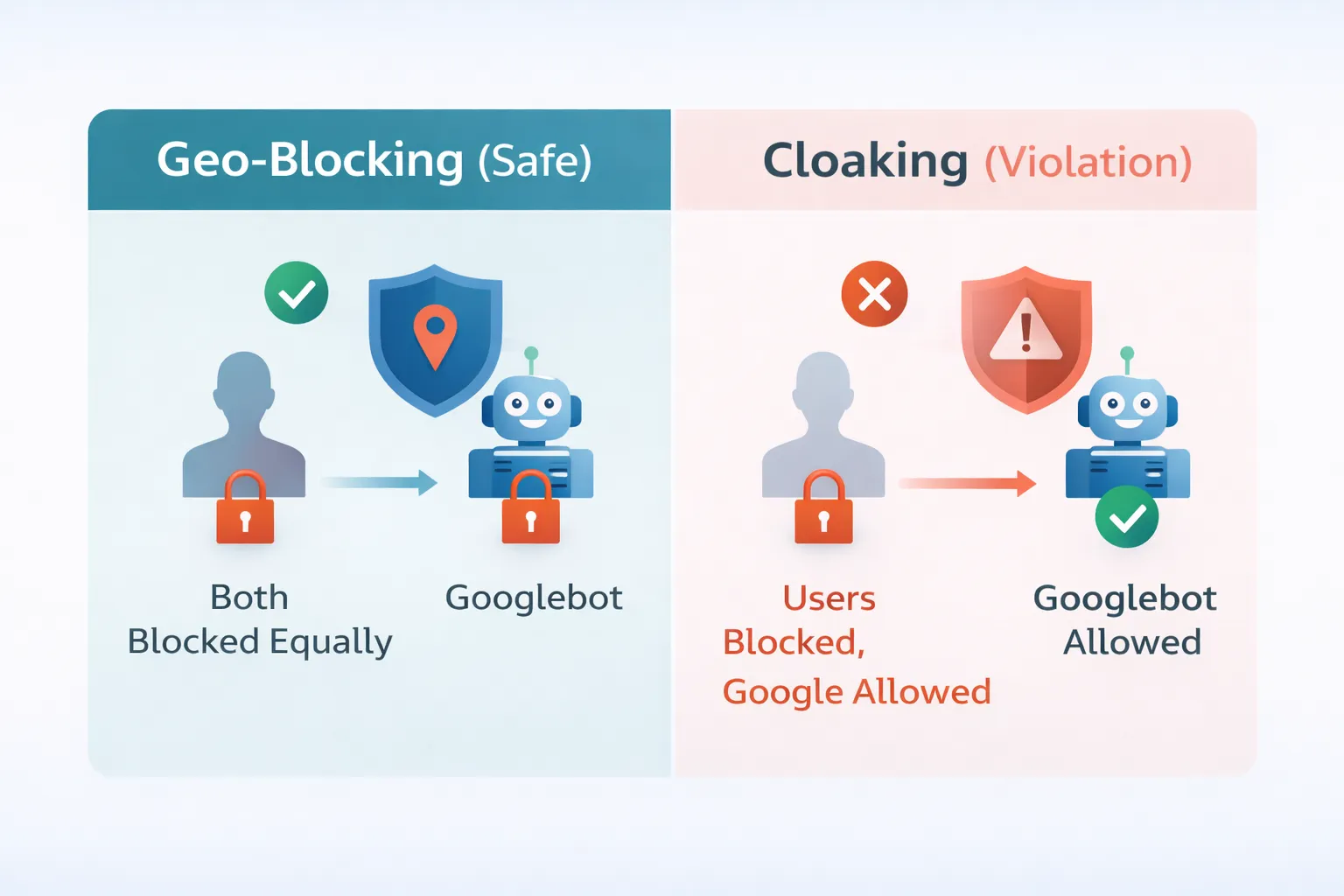
In SEO, cloaking means showing different content to search engines than to human visitors. It was often used to hide spam or manipulate rankings. Geo-blocking can sometimes look similar, which causes confusion even among Google experts.
John Mueller from Google once suggested that blocking entire countries could be seen as cloaking. Later, Danny Sullivan clarified: if your server consistently blocks all traffic from a specific region, it is geolocation, not cloaking. The rule is simple, you must treat Googlebot exactly like any other user from that region.
Comparing Blocking and Cloaking
| Strategy | Treatment of Bot | Treatment of Human User | SEO Status |
| Standard Blocking | Blocked (by IP) | Blocked (by IP) | Safe (Geolocation) |
| Cloaking | Allowed | Blocked | Violation (Risk of Penalty) |
| Soft Challenge | Challenged (JS) | Challenged (JS) | Safe (Security Filter) |
This table shows that as long as your geo-block is consistent and not designed to deceive search crawlers, it is considered a legitimate technical choice. By following these best practices, you can protect your site from malicious traffic without risking SEO penalties.
The Rise of Generative Engine Optimization (GEO) in 2026
As we move into 2026, traditional SEO is shifting toward Generative Engine Optimization (GEO). GEO ensures your content is cited, summarized, and referenced by AI-powered answer engines like ChatGPT, Google AI Overviews, Gemini, and Perplexity. For GEO, geographic blocking can have even greater consequences than for standard search.
How AI Crawlers Work
AI crawlers now make up about 4.2% of global HTML requests. Bots like GPTBot, ClaudeBot, and Meta-ExternalAgent break your website content into 100–400 token passages. They store these passages in vector databases for real-time answers.
If you block the regions where these AI firms host their infrastructure, your website’s content is excluded from AI knowledge bases. That means your brand may not appear in AI-driven answers or summaries.
AI Crawlers, Markets, and Blocking Impact
| AI Crawler | Primary Market Presence | Respects robots.txt | Impact of Blocking |
| Googlebot (Mixed) | Global | Yes | Loss of search & AI overviews |
| GPTBot (OpenAI) | Global | Yes | Brand exclusion from ChatGPT |
| ClaudeBot | North America / UK | Yes | Absence in Anthropic models |
| Meta-ExternalAgent | Global | Yes | No citation in Meta AI / LLaMA |
Why This Matters for Your Brand
In 2025, search marketing shifted from competing for the “top ten blue links” to competing for the best answer citation. If AI crawlers are blocked, your brand may be absent from summaries and AI responses. This can lead to organic click-through rate decay, as users rely on AI-generated answers instead of visiting individual websites.
Case Studies: The Real Costs of Misconfigured Geo-Blocking
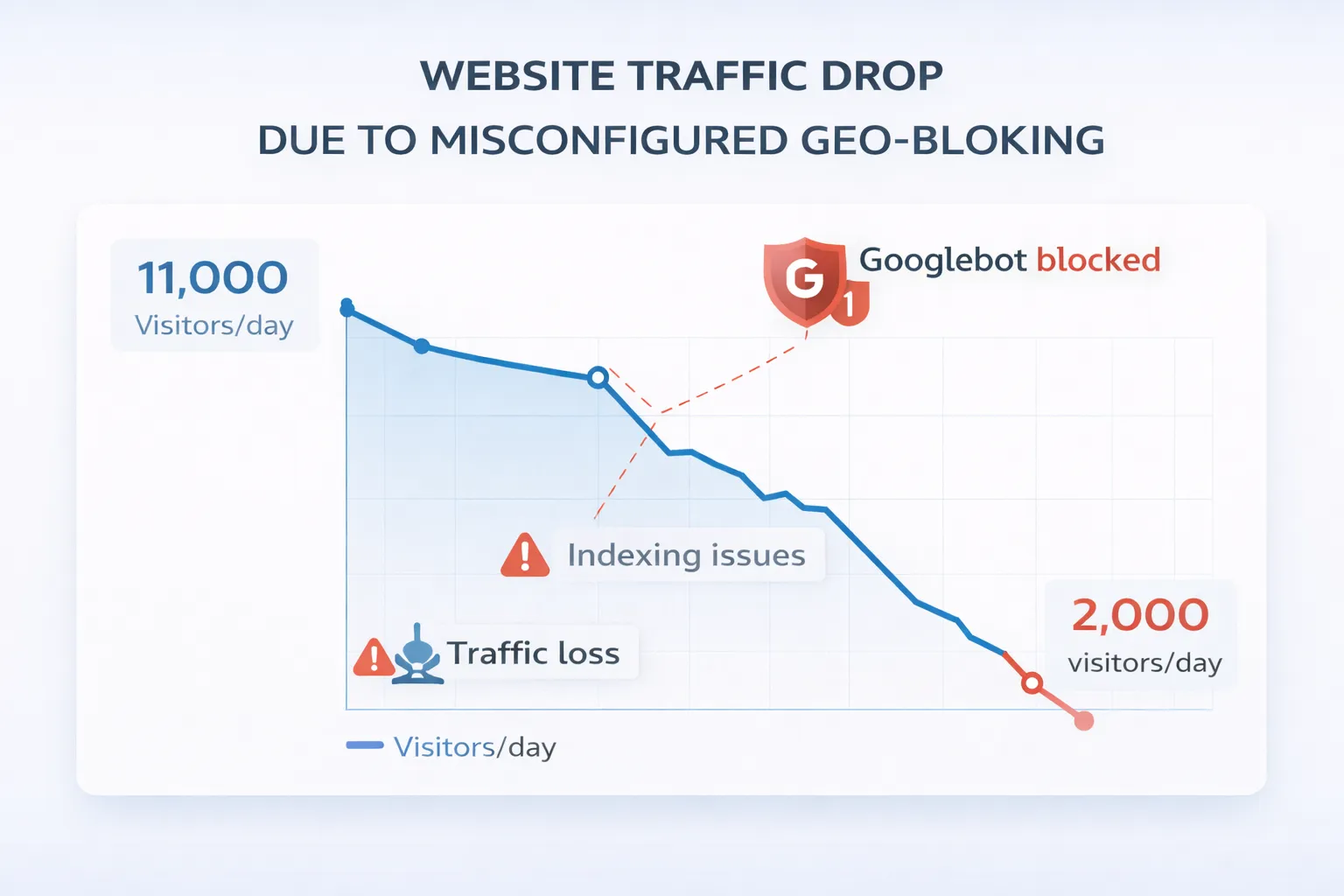
Technical SEO audits show how aggressive geographic filtering can backfire. These real-world examples highlight the risks and recovery challenges for websites.
Shopify Client: Blocking Bots vs. Googlebot
One Shopify client used a GEO-blocking app to stop fake orders from Russia and Eastern Europe. The app was meant to block human traffic only, but it relied on an imperfect IP list. As a result, some Googlebot nodes were blocked accidentally. Within days, the site started disappearing from Google’s index. Recovery required emergency reconfiguration and months of effort to restore authority.
Educational Website: Complexity Amplifies SEO Damage
Another case involved an educational site with 11,000 daily visitors. After multiple Google Core Updates, technical issues—including 404 errors and crawlability problems—were worsened by poorly configured regional redirects. Traffic fell to 2,000 daily visitors. Recovery involved redirecting locale-specific subdirectories back to the main domain and removing “zombie” pages with no traffic for over a year.
Key Lessons from These Cases
These examples show that mismanaged geo-blocking can cause:
- Duplicate indexing
- Chaotic internal linking
- Long recovery periods
- Significant drops in search visibility
If you block regions without careful planning, your SEO can suffer for months. Proper configuration and testing are essential to protect your traffic and domain authority.
SEO-Safe Strategies for Managing Geographic Restrictions
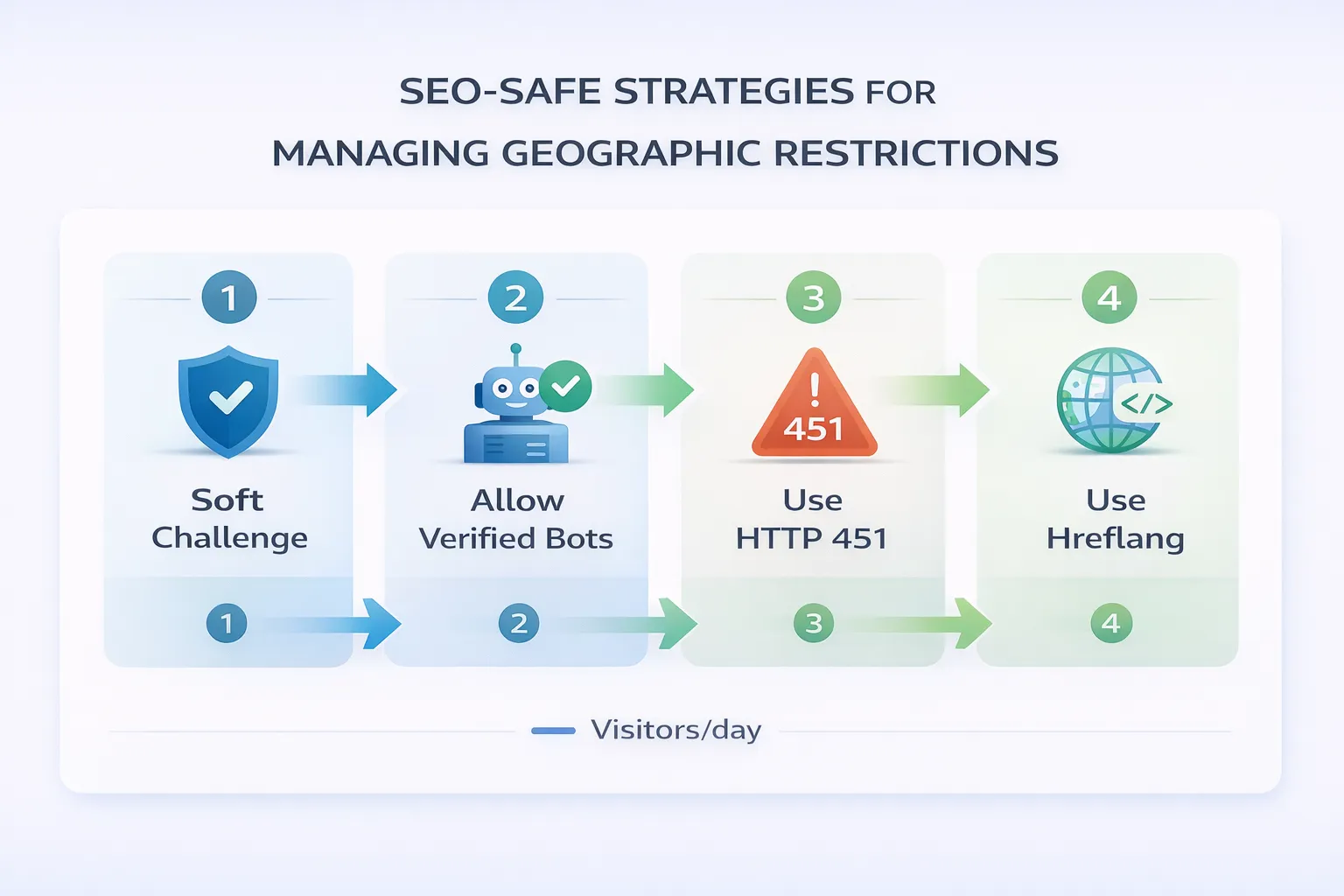
If your business needs to block traffic for legal, security, or commercial reasons, you can still protect SEO by using a bot-aware, zero-trust framework. These strategies balance security with search visibility.
1. Use a Soft Challenge Instead of Hard Blocks
Instead of returning a 403 Forbidden, apply a Managed Challenge or JavaScript challenge at the edge, for example via Cloudflare.
- How it works: When a request comes from a blocked country, the server presents a lightweight JavaScript task.
- SEO impact: Legitimate search engine crawlers like Googlebot and Bingbot can solve these challenges. They continue indexing your content, while malicious bots, unable to render JavaScript, are stopped.
2. Explicitly Allow Verified Search Engine Bots
Set firewall rules to bypass verified bots.
- Implementation: In Cloudflare, use the cf.client.bot field to exclude verified crawlers from geographic security rules.
- Why it matters: This prevents gaps where Googlebot or other crawlers use new IPs not yet added to manual allow-lists.
3. Use Transparent Status Codes
When content must be blocked for legal reasons, use HTTP 451 instead of 403 or 404.
- SEO benefit: It tells search engines the page exists but is intentionally restricted. This preserves domain authority better than simply refusing access or serving a missing page error.
4. Optimize Your International SEO Structure
Rather than blocking countries, guide users to the right regional content with proper SEO practices.
- Subdirectories vs. ccTLDs: Use subdirectories like example.com/uk/ to consolidate authority while signaling regional relevance.
- Hreflang tags: These are essential. They tell search engines the relationship between different language or regional versions, avoiding duplicate content issues and improving indexing accuracy.
The Strategic Role of Content Delivery Networks (CDNs) in SEO
CDNs are often promoted as a fix for global performance, but their impact on geographic SEO is more nuanced. A CDN delivers content from servers closer to your users, improving Time to First Byte (TTFB) and Core Web Vitals. However, for dynamic sites like e-commerce stores, the location of your origin server still matters.
Local Server vs. CDN Edge
| Factor | Local Server Placement | CDN Edge Implementation |
| Latency | Consistently low for local users | Variable depending on cache hits |
| SEO Signal | Strong local search signal | Broad global speed signal |
| Security | Minimal inherent protection | Strong WAF & DDoS mitigation |
| Compliance | Easier to manage data sovereignty | Complex cross-border flows |
For best results, many agencies recommend a hybrid approach: host the origin server in your primary market (e.g., Chicago for U.S. users) while using a CDN for global delivery. This ensures low latency for your main audience and fast, reliable service for secondary users and crawlers.
Monitoring and Auditing Your Geographic Blocks
Geographic blocking is not a “set and forget” feature. You need to actively monitor it to avoid SEO problems.
Weekly GSC Audit
Check the Crawl Stats report for spikes in 403 or 4xx errors. A sudden drop in indexed pages is a major warning sign.
VPN Testing
Manually access your site from a blocked country using a VPN. Ideally, users should see a soft challenge instead of being completely blocked.
Bot Verification
Regularly check server logs to ensure traffic labeled as Googlebot comes from verified Google IP ranges. This prevents accidental blocking of legitimate crawlers.
Final Thoughts
The rise of geo-distributed crawling and Generative Engine Optimization (GEO) means blind geo-blocking can remove your brand from AI summaries and search knowledge graphs. To stay visible, treat crawlers and AI agents like sophisticated users rather than threats. The future of SEO isn’t just rankings, it’s presence in AI-driven knowledge networks.
To protect your SEO while blocking risky traffic, use Soft Challenges to stop malicious users without affecting crawlers, maintain Verified Bot exceptions for trusted bots, serve HTTP 451 status codes for restricted content, and filter traffic based on behavior rather than geography. These steps secure your site while keeping content discoverable, indexed, and ready for AI-driven search.
FAQs
Does blocking a country stop my site from appearing in their search results?
Yes. If your site is consistently inaccessible in a region, search engines will eventually de-index it there. While this may be intentional for security, it prevents your site from gaining international authority and backlinks from that region.
Will blocking one country hurt my rankings in other countries?
Not directly. Google generally keeps regional signals separate. However, if a block is misconfigured and prevents Googlebot from crawling correctly, it can trigger a crawl anomaly, potentially causing global ranking drops or de-indexing.
Is it better to use a 403 Forbidden or 404 Not Found error for blocked traffic?
Neither is perfect, but a 403 is more accurate for blocking access. A 404 signals that the page doesn’t exist, which can lead to faster removal from the index. For legal or compliance-related blocks, the recommended standard is HTTP 451, which informs search engines that the content exists but is intentionally restricted.
How does geo-blocking affect AI-generated answers?
If you block regions where AI companies like OpenAI, Anthropic, or Meta host crawlers, your content may be excluded from AI-generated summaries. This can leave your brand absent from ChatGPT, Claude, or Google AI Overviews, a risk known as “silence” in the generative search era.
Can I block countries while still allowing Googlebot to access my site?
Yes. Use Verified Bot allow-lists in your WAF (like Cloudflare) or implement Soft Challenges that legitimate crawlers can pass. This filters malicious traffic without hurting your search visibility.
Does the accuracy of IP geolocation matter for SEO?
Absolutely. Country-level geolocation is accurate around 99.5%, meaning a small fraction of legitimate users may still be blocked. City-level targeting drops to about 80% accuracy, increasing the risk of blocking real customers or important crawlers.
What is a Managed Challenge, and why is it recommended?
A Managed Challenge, offered by services like Cloudflare, is a lightweight browser test that identifies bots. Unlike a hard block, it lets legitimate users and crawlers like Googlebot pass, protecting your indexing while stopping malicious traffic.