
Did you know that Google Business Profile (GBP) was previously known as Google My Business (GMB)? It is a free management tool that Google provides for businesses to curate how their profile is presented across Google Search and Google Maps.
When it comes to local business’s digital strategy, GBP stands as the single most critical asset. It can be considered the modern digital storefront that helps customers find, analyze and connect with your business instantly.
Research shows that 48% of all interactions on Google Business Profile lead directly to the business’s website. This indicates a business’s profile is not just a simple online listing, it acts as a key driver of traffic, leads and conversions.
This article walks you through a clear, step-by-step process of optimizing your Google Business Profile. You will learn how to set it up correctly and improve visibility. Moreover, we will discuss how you can use it strategically to outperform competitors while securing your place in the local map pack, where real customer action happens.
What Is Google My Business and Why It Matters
The Google Business Profile, or Google My Business, is a free management tool that helps businesses manage how they appear in Google Search and Google Maps. Using this tool allows you to control key information about your business. For example, your name, address, phone number, working hours, customer reviews, services, and even photos and videos. All of this is displayed in one central place that makes it easy for potential customers to learn about your business and take action.
The question is why businesses need to optimize their GMP listing. A straightforward answer is “it acts as a conversion engine”. When a business optimizes their GMP listing, they can turn searches into real actions. And it’s not just an opinion, data clearly supports this. According to a study, besides website visits, 34% of customer interactions on a profile are direct requests. It shows people’s intent to visit the physical location. And another 17% of interactions are phone calls that means users want to connect with the business right away.
These numbers clearly indicate that an active, well-managed Google Business Profile brings real-world results, attracting more visitors, more calls, and more customers.
Not only that, but an optimized GMP tells Google that the business is legitimate, trustworthy, and active too. This helps build your online credibility and improve visibility through a ranking factor known as “Prominence”.
The Role of Google Business Profile in Local SEO Success
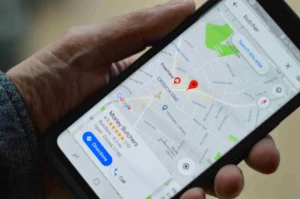
Proximity, Relevance, and Prominence are three main pillars of Google’s local ranking system. Businesses need to understand and apply these if they really want to win visibility in local search results, especially a spot in Google’s Local Map Pack.
The Three Pillars of Local Ranking
Here’s how the three main pillars of local rankings function.
- Proximity:
Proximity means how close your business is to the person searching or to the location mentioned in the query. For instance, if someone searches “lawyers in Midtown.” The Google results will show lawyers in the mentioned vicinity.
- Relevance:
Does your business profile match the query of the searcher? Google measures the relevance of a business looking at its profile. Therefore, to appear in the search results. Your categories, services, and descriptions should clearly align with the searcher’s intent.
- Prominence:
Google uses this metric to evaluate your business’s reputation. It analyzes the review quality, quantity and consistency over time. This shows that Google prefers those businesses that focus on improving customer experiences.
Your Business Profile provides Google the central information for determining rankings in the Local Pack. From your business name, address, and categories to reviews,working hours and products/services, all of this information contributes to how well you rank in local search results.
The Multiplier Effect of Prominence
Though all of these ranking factors are important, Prominence carries special weight because it shows how credible and authentic your brand appears. Customer reviews play a main role here. With Google hosting over 80% of all online review activity across various industries, it is essential to maintain a strong review strategy. It directly impacts visibility and conversions.
When a profile consistently gets genuine, high-quality feedback, it creates a positive feedback loop. This means better reviews lead to higher rankings, which bring more customers. This in turn generates even more reviews.
That is why, once you set up your basic business details like Name, Address, and Categories, the next important thing is to manage your reviews. Asking your happy customers to leave reviews and responding to reviews is one of the most effective ways to keep your business profile visible, high-performing and trusted.
Another key factor to remember is that Google Business Profile requires continuous engagement. It is not something you set up once and forget.
How to Set Up and Verify Your Google Business Profile
It is important for businesses to follow Google’s official policies carefully to set up your Google Business Profile. Your profile must represent your real business. The name, location, and details used on your signage, website, and legal documents should be the same across all channels.
Foundational Policy Compliance
Each physical business location can have only one Google Business Profile. Google’s system can get confused if you create duplicate profiles. It may lead to your profile being suspended.
Your address should be complete, accurate, and represent a real, staffed location. Google does not allow the use of virtual offices, mailboxes, or P.O. boxes. Doing so may result in immediate suspension.
The Verification Process
Google verifies that the business you claim to have is real and operates from the same location. In the past, Google used to verify via postcard, but now it offers more flexible, faster methods. For example:
Video Verification:
It is the most common and fastest method. You will use a mobile device with location services on and record a short video. It will show your business location, signage, and operations. For example, your office, workspace, or products. It will help Google confirm authenticity in real time.
Phone or Text Verification:
Businesses can also verify through phone. If available, you can receive a verification code through a phone call or text message. Your business number must be able to answer calls or receive texts directly. However, automated IVR systems cannot be used.
Postcard Verification:
This is a traditional method and is not very common. In this process, Google sends a physical postcard with a unique code to your business address. This method is only used when no other options are available.
Bulk Verification:
Google also allows bulk verification with businesses with 10 or more locations. Once approved, it eliminates the need to verify each location individually, saving significant time and effort.
Tips to Write the Perfect Business Description
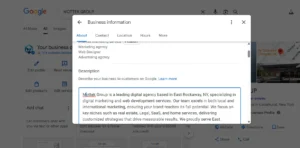
How you write your business description is one of the most important parts of your Google Business Profile. It plays a critical role in local SEO. However, Google restricts you with a certain word count limit and clear content rules. So, every word counts.
Mastering the Character Limit
Google allows up to 750 characters for the description. However, only the first 250 characters are visible before users click “More”. That means you must include the most important details of your business, like your business name, core services, and location, in the beginning.
Strategic Writing Guide
With this restricted word count limit, here are some strategic writing tips that will make your business description more effective and trustworthy.
- Start with Value and Location:
Introduce your business clearly. In the first 250 characters, describe who you are, what you offer, and where you operate.
- Highlight What Makes You Different:
Utilize the remaining space to describe your unique strengths, services or specializations that make your business different from others.
- Use Keywords Naturally:
Keywords play a crucial role in SEO. They improve visibility, but it is necessary to use them naturally. Brands must avoid “keyword stuffing” because it hurts readability and may violate Google’s policies.
- Add a Subtle Call to Action:
Also end with a polite call to action that encourages users to learn more. For example, you can use, “Discover more about our services” instead of overly promotional phrases.
Strict Prohibitions
Google also has some strict policies for writing GBP. It prohibits:
- Adding links, HTML code, or promotional offers
- Using keywords unnaturally or repetitively.
- Including offensive or misleading content.
Google separates content types for specific reasons. Your business description should be factual and timeless. However, Google posts can be used for short-term updates, events or promotions.
With this balance, you ensure your business profile remains compliant and professional while still engaging customers through regular updates.
How to Choose the Right Business Categories and Attributes
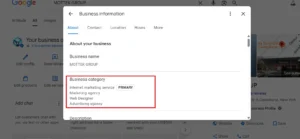
To appear in relevant local searches, it is important to choose the right categories and attributes. If your categories are inaccurate, there are chances your profile will never show up in the Local Map Pack even if your business is nearby and legitimate.
Category Hierarchy and Selection Rules
Google offers you to choose from two category levels.
- Primary Category:
You only choose one primary category. It defines your main business type. For example, Dentist, Real Estate Agency, Electronics Store etc. With this primary category, you select from secondary options and attributes available.
- Secondary Categories:
Secondary categories describe your additional services. For example, if your primary category is “Restaurant”, your secondary category will be “Pizzeria”, “Catering Service” etc.
Here are some important things that you need to remember while selecting categories:
- Choose the fewest possible that accurately describe your main operations.
- Be specific and truthful. Never pick categories just to include keywords.
Strategic Use of Attributes and Services
Attributes add helpful details customers often filter for. For example, “wheelchair accessible,” “women-owned,” or “accepted payment types”. By filling in all relevant attributes, you increase your chances to appear in more specific searches. Moreover, updating your services section helps improve relevance.
In fact, categories tell Google about your business, like what your business is, and services reflect what you offer. Categories tell Google what your business is; services show what you offer. Listing detailed, keyword-rich services (e.g., “emergency pediatric dental service”) helps your profile rank for long-tail local queries. Using this approach gives you an edge over competitors.
How to Manage Reviews on Google Business Profile Effectively
Reviews are vital for your Google ranking. They directly impact prominence, a major ranking factor. Since Google handles more than 80% of all online reviews, it is the primary place where customers form and share opinions and make decisions.
The Measurable Impact of Review Velocity
Businesses that are able to collect authentic, consistent reviews build credibility and boost visibility over time. A steady flow of genuine feedback improves engagement and directly translates into measurable results:
| Action Channel | Average Impact of One Additional Review |
| Website Traffic | ~80 additional visits |
| Physical Visits (Directions Requests) | ~63 direction requests |
| Direct Calls | ~16 phone calls |
All of these metrics indicate that every review has tangible business value.
Effective Review Response Strategies
How you respond to reviews matters a lot. Here are some useful strategies to deal with positive as well as negative customer reviews.
- Positive Reviews:
Your reply should be brief and sincere. Add some personal touch while responding to the client. Thank the customer, and also sign off with a name or initials to make it feel authentic.
- Negative Reviews:
While dealing with negative reviews, always respond professionally. Instead of reacting right away, check your internal records to understand the issue. Show empathy and apologize if appropriate. Don’t blame the customer, and avoid sharing private details.
Stay calm and patient. Your response shows your business’s professionalism as much as the review itself.
The Mandate for Authenticity
In late 2024, Google launched a major crackdown on fake or paid reviews. The platform deleted thousands of entries across various industries. This move made authenticity a non-negotiable standard.
Manipulating reviews can now risk profile suspension and long term loss of trust. It is necessary to build organic, consistent and transparent review growth to be successful in the long run. These Google reviews are like your continuous marketing channel, all that you need is active management, not manipulation.
Updating Your Google Business Profile for Better Visibility
Google Business Profile optimization does not end after setting up. It is a continuous process, your profile needs to be updated on a regular basis. It helps you stay competitive and credible.
Consistency and Updates
Your NAP or name, address and phone should be consistent across all platforms.
- Your Google Business Profile
- Your website
- External directories and official listings
It is important to understand that even small mismatches like different phone formats or missing site numbers can affect your credibility. These differences may also trigger Google’s system to flag inconsistencies. Also, ensure your hours and address always match your website’s information.
Leveraging Google Posts
Use Google Posts to show your business is active. Keep sharing on a regular basis:
- New updates or offers
- Events
- Seasonal messages
This signals Google that your profile is well managed and gives customers new reasons to engage. Remember, Google posts are for sharing promotions and your description should only include facts about your business.
Media Strategy
Nowadays, high quality visuals are vital for SEO. Always choose to upload clear photos and videos that showcase your brand and services effectively.
- Use your logo as your profile image.
- Choose a high-resolution, appealing cover photo that represents your business.
- Keep adding new visuals regularly.
Though Google sometimes picks which image to display based on search context, maintaining a strong media library ensures your business always looks credible and professional.
Optimizing the Q&A Section
The Q& A section can be considered live FAQs. These do not play any role in rankings but a strong conversion driver.
Here are some best practices to follow:
- Proactively add and answer common questions about your services, pricing, or policies.
- Respond to all new questions within 24 hours.
- Upvote the most useful answers so they appear at the top.
With a well maintained Q& A you not only save their time but also build trust even before they contact you.
Common Mistakes to Avoid in Google Business Profile Optimization
In most cases, businesses lose ranking or face penalties for violating Google’s rules unintentionally. The table below shows some common pitfalls and their consequences:
| Violation Type | Action | Risk/Impact |
| Identity Manipulation | Adding extra keywords to the business name | Major suspension risk; damages trust and authenticity |
| Location Misrepresentation | Using virtual offices or P.O. boxes | Violates location policy; likely suspension |
| Availability Misrepresentation | Listing false business hours (e.g., “Open 24 Hours” when not true) | Misleads users and triggers suspicious activity alerts |
| Listing Duplication | Creating multiple profiles for one location | Causes data conflicts and often leads to suspension |
| Data Inconsistency | Frequent or contradictory edits (e.g., mismatched address/hours) | Raises manipulation flags in Google’s system |
Some other violations include:
- Operating online only without a physical presence
- Overlapping service areas across different listings
- Sharing the same number among multiple profiles.
It is important to stay updated with Google’s official guidelines and ensure all information aligns with eternal records. It helps you stay compliant.
Ways to Deal with Fake or Scam Reviews

Handling fake or misleading reviews requires a clear understanding of what qualifies for removal under Google’s content policies. Google will only take down reviews that break specific rules. For example, the ones containing profanity, spam, off-topic content, or private information. Unfortunately, a simple negative opinion, even if it feels unfair, does not meet the criteria for removal.
You need to follow a pathway to get a negative or fake review removed from your profile.
How to Report a Fake or Inappropriate Review
Follow this process if you find a false or policy-violating review on your profile.
1. Flag the Review Immediately:
The first step is to go to your Business Profile. Then open the “Read Reviews” section, click on the offending review and press “Report” You need to clearly indicate the violation type e.g. if it is spam or an inappropriate content.
2. Use the Reviews Management Tool:
Use Google’s dedicated Reviews Management Tool to submit the report. It offers better tracking by confirming receipt of your report and lets you monitor progress.
3. Submit a One-Time Appeal:
If the offending review is not removed after the initial report. You have a single chance to appeal for eligible cases. This is your final opportunity to contest the decision.
The key is to align your claim with Google’s specific policy definition while reporting a review. For example, “Spam” covers fake, paid or incentivized reviews. It is an area that Google actively polices. By demonstrating clearly how a review violates these standards, strengthens your case.
Near Me Searches: Myth vs. Reality
Most often the idea of “near me” searches get misinterpreted in local SEO. Many businesses still think that stuffing website content with the phrase “near me” will help them ensure higher rankings.
The truth is that Google determines “near me” results based on real-time location data, not keywords. Proximity is automatically calculated by the user’s actual location at the moment of search. “Near me” queries also reflect strong transactional intent. This means people using them are ready to buy, visit, or call right away.
How to Rank in a Proximity-Based System
While you can’t control where users are physically located, you can optimize the other two key ranking factors: Relevance and Prominence. Ensure your Google Business Profile is 100% complete with accurate categories, detailed attributes, and clearly defined services. Pair this with a consistent stream of authentic reviews to strengthen reputation signals. This combination makes your business the most relevant and trustworthy option within any given local radius.
What to Do If Your Google Business Profile Gets Suspended
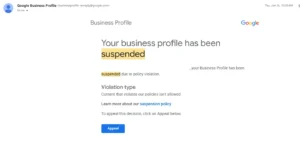
A profile suspension can instantly disrupt visibility and lead to lost revenue. The first rule: don’t panic, and never create a new listing for the same business while your appeal is in progress. Doing so violates Google’s policies and may delay or block reinstatement.
Step-by-Step Recovery Process
Below is the step-by-step recovery process.
- Identify and Fix the Problem:
Review your profile against Google’s official policies. Correct every violation, whether it’s keyword stuffing in your business name, an incorrect address, or misleading operating hours, before you file an appeal.
- Submit an Official Appeal:
Use Google’s designated Business Profile Appeals Tool.
- Provide Evidence (Within 60 Minutes):
If Google requests proof, you have a strict 60-minute window to submit all supporting documents. Evidence must clearly demonstrate that your business exists and operates at the listed location. Required materials often include business licenses, utility bills, and photos showing your permanent signage and building exterior.
To prepare for such emergencies, keep a digital folder ready with all verification documents and current location photos. Quick access can make the difference between days and weeks of downtime.
Conclusion
Winning in local search isn’t about one-time setup—it’s about consistent, disciplined management of your Google Business Profile. Long-term visibility depends on three core principles:
- Accuracy – Ensure all information (NAP, categories, services) is precise and up to date.
- Authenticity – Encourage genuine customer reviews and respond professionally to every piece of feedback.
- Activity – Keep your profile alive with regular posts, updated media, and prompt Q&A responses.
Google Business Profile is your living digital storefront, it needs continuous care, data accuracy, and customer engagement. By maintaining this balance, your business not only survives but dominates in the ever-competitive local search space.