
If your business cannot be found online, it struggles to exist. Around 53 percent of all website traffic comes from organic search, which makes SEO a primary source of long term visibility and leads. At the same time, design shapes trust. Research shows that 94 percent of first impressions are design related, and about 70 percent of users judge a brand’s credibility based on its website.
This puts creative and service based businesses in a tough spot. A website must rank well and look intentional at the same time. Showit has become popular with photographers, designers, and personal brands because it offers full creative control without code. The concern, though, is clear. Does this design freedom limit SEO performance?
In this blog, we examine Showit’s SEO from a technical and strategic angle. You will learn what Showit does well, where it has limits, and how it compares with other website builders when search visibility matters.
What Is Showit?

Showit is a no-code website builder created for people who care deeply about how their brand looks and feels online. If you have ever felt limited by block-based builders or rigid grid systems, Showit works very differently. Instead of forcing you into pre-made layouts, it gives you a free-form canvas where you can place text, images, and design elements exactly where you want them.
You are not snapping content into rows or columns. You are designing visually, almost like working inside a design tool rather than a website builder. This level of control supports visual storytelling and precision, which matters when brand perception is on the line.
Research shows that 88 percent of users are unlikely to return to a website after a poor experience, and design plays a major role in that first impression.
The Design Philosophy Behind Showit
Showit is built for creative professionals who need a custom, high-end aesthetic to support premium pricing. If you are a photographer, designer, or personal brand, your website often acts as proof of your quality. The platform’s interface feels similar to tools like Adobe Illustrator, which makes it easier for you to build layered layouts and complex compositions without writing code.
By removing the technical barrier, Showit lets you focus on translating your creative vision directly onto the screen. This is important because strong interface design does more than look good. Well-designed user experiences can significantly improve conversions, which means your site is working for you, not just displaying your work.
How Showit and WordPress Work Together
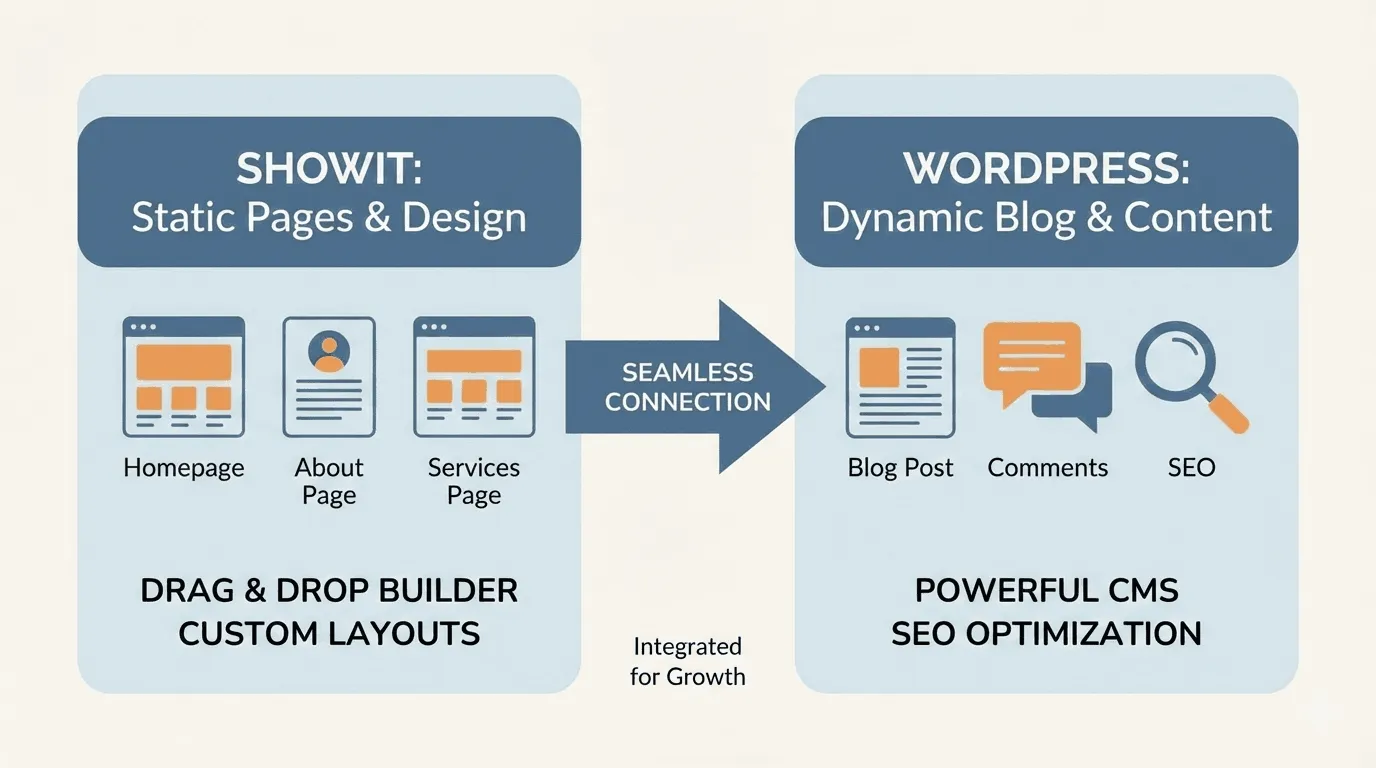
One of the most important things you need to understand about Showit is its hybrid setup. Showit does not try to replace WordPress. Instead, it works alongside it.
Your static pages such as Home, About, Services, and Contact are designed and hosted directly on Showit. Your blog, however, is powered by WordPress. Showit controls how the blog looks, acting as the design layer, while WordPress handles content management and search engine indexing behind the scenes.
For you, this means your visually rich pages are served from Showit’s servers, while your blog content runs on performance-focused managed hosting like WP Engine. This structure allows you to benefit from WordPress’s established SEO strengths without giving up creative control.
Showit vs WordPress Responsibilities
| Component | Showit Environment | WordPress Environment |
| Primary Use | Static pages like Home, About, Services | Blog posts and archives |
| Design Control | Pixel-level drag-and-drop control | Managed through Showit blog templates |
| SEO Focus | Basic metadata and page structure | Advanced content optimization using plugins |
| Hosting | Showit proprietary servers | WP Engine managed hosting |
| Customization | No coding required | Plugin-based expansion such as Yoast |
How SEO Works on Showit Websites
SEO on Showit requires you to think in two parts. Because design and content management are split between Showit and WordPress, optimization happens in both places.
Your static pages are optimized inside the Showit app, while your blog relies on WordPress. This setup allows you to use WordPress for content publishing, indexing, and authority building, which is important since search engines prioritize websites that publish fresh and useful content regularly.
When you publish a blog post in WordPress, Showit pulls that content into a pre-designed template. This keeps your site visually consistent while ensuring your content remains in a format that search engines are already familiar with.
On-Page SEO Controls Available to You
Showit gives you manual control over essential on-page SEO settings. For every static page, you can access an SEO settings panel inside the Showit editor. This is where you add meta titles and meta descriptions that appear in search results.
These elements matter because they influence click behavior. The higher your page appears and the clearer your message, the more likely users are to click. You need to enter these details yourself to avoid default page titles that may not align with your keywords.
Heading Structure and Content Hierarchy
You can assign heading tags like H1, H2, and H3 to any text element without changing how it looks on the page. This gives you flexibility to structure content for search engines while keeping your visual layout intact.
That flexibility also means responsibility. You need to apply headings intentionally so search engines can clearly understand what your page is about and how the content is organized.
Image Alt Text and File Optimization
Every image you upload to Showit includes a description field that functions as alt text. This text helps search engines and screen readers understand what the image represents. Showit also allows you to add alt text to background images, which improves accessibility and image search visibility.
While Showit handles basic image resizing, you should still optimize images before uploading them. Proper file sizes help improve load times, which supports both user experience and SEO.
Is Showit SEO Friendly?
Showit gives you the tools needed to rank in search results, but it does require more hands-on management than some traditional platforms. Because Showit is built with a visual-first approach, certain technical SEO elements need your attention to make sure search engines can crawl, understand, and rank your site properly.
Technical SEO on Showit
Technical SEO is about how easily search engines can access your site and how well your pages perform for real users. This includes site structure, mobile behavior, speed, and indexing controls.
Code Structure and Site Layout
You may hear concerns that drag-and-drop builders create bloated code. With Showit, the HTML output mirrors how elements are stacked inside the editor. This can result in a deeper document structure compared to a hand-coded HTML site.
There is also a quirk you should be aware of. Elements layered from top to bottom in the editor are sometimes rendered in reverse order in the HTML. In certain cases, this can make it harder for search engines to interpret content hierarchy correctly. It does not mean your site cannot rank, but it does mean your layout decisions affect more than just visuals.
Mobile Responsiveness and Indexing
More than half of all web traffic comes from mobile devices, which is why Google uses mobile-first indexing. Showit addresses this by giving you a separate mobile editor where you can design the mobile version of your site independently.
This gives you excellent control over the mobile experience, but it also adds responsibility. If you hide important text or headings on mobile, Google may not index that content as strongly. You need to make sure critical SEO content remains visible and accessible on both desktop and mobile views.
Page Speed and Performance
Page speed plays a direct role in rankings and user behavior. Even a one-second delay can significantly increase bounce rates. Showit sites can perform well, especially when images are properly optimized.
That said, performance can suffer if too many hidden elements, large images, or unnecessary scripts are used. Because Showit relies on JavaScript and layered design, you need to be intentional with your layouts to protect Core Web Vitals and overall load time.
URL Structure and Indexing Control
Showit allows you to customize page slugs, which gives you control over how your URLs appear in search results. However, page names inside the editor are directly tied to live URLs.
If you rename a page, the URL changes automatically. Without redirects, this can lead to broken links and lost SEO value.
Redirect Management
When you are running a blog through WordPress, Showit provides access to a redirection plugin. This allows you to track 404 errors and set up permanent redirects when URLs change. Using redirects correctly helps preserve link equity and prevents ranking losses when pages are moved or renamed.
Indexing Settings You Can Control
Showit includes an option to ask Google not to index a page. You can find this setting inside the advanced page options. This is useful when you want to keep private landing pages, test pages, or policy documents out of search results.
Used correctly, this feature gives you more control over what appears in search and what stays hidden.
Showit SEO Pros
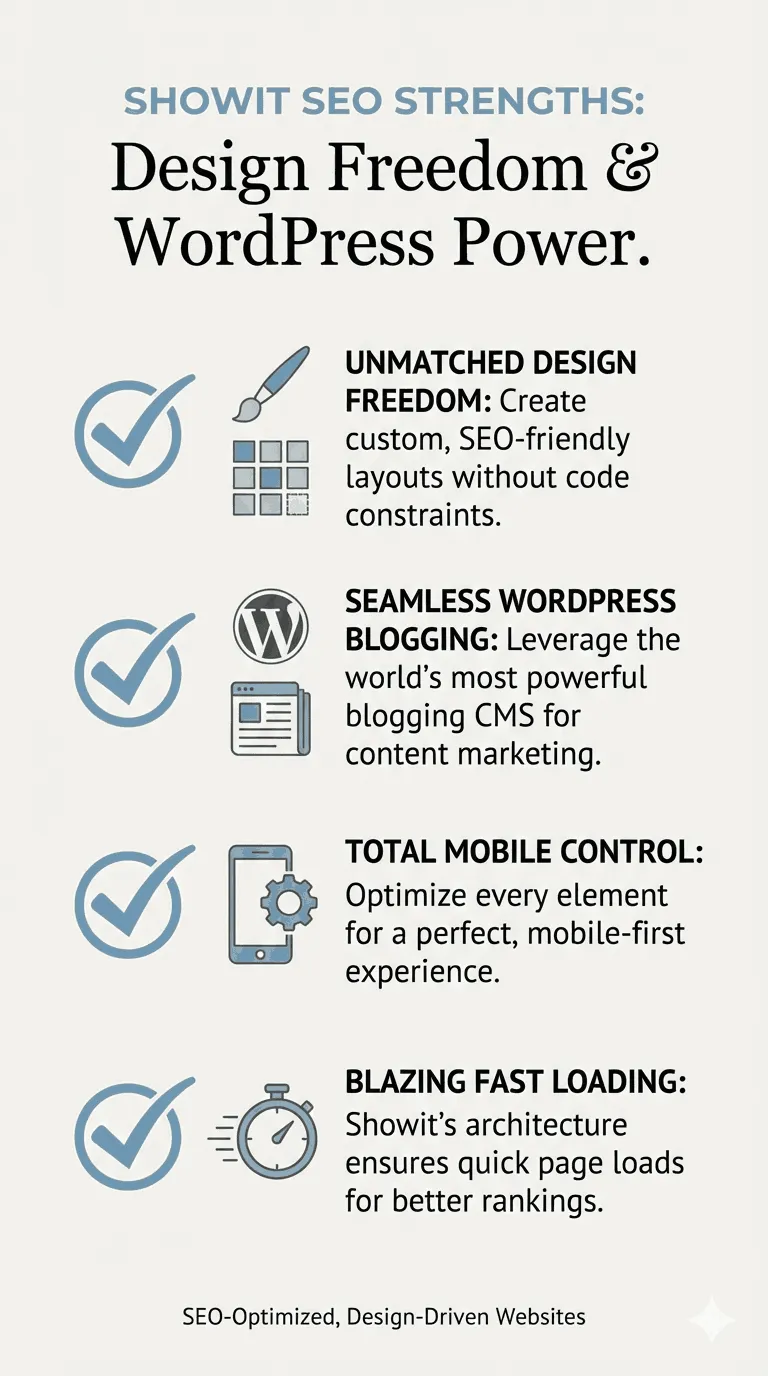
The strengths of Showit for SEO come from two main areas: the quality of user experience you can create and its connection with WordPress.
Full design freedom without theme limits
You are not locked into templates or containers. If your site looks polished and intentional, visitors are more likely to stay, explore, and trust your brand. Strong visual design can help reduce bounce rates, which average around 49 percent across industries.
Strong blogging SEO through WordPress
Showit gives you access to WordPress for blogging, which means you can use established SEO plugins like Yoast SEO or RankMath. These tools help you optimize content in real time, manage schema markup, and structure posts in a way search engines understand.
Mobile-specific design control
You can design your mobile site separately from desktop. This allows you to adjust font sizes, remove heavy video backgrounds, and simplify layouts for smaller screens, which helps improve mobile load times and usability.
No forced templates or rigid layouts
If you understand SEO-friendly site structure, you can build it exactly the way you want. You are not restricted by predefined sections or layout rules, which gives you more control over both design and content flow.
Showit SEO Cons
Showit can support SEO, but it also places more responsibility on you.
Page speed depends on your design choices
The biggest SEO risk on Showit is overdesigning. Large images, heavy animations, and too many layered elements can slow your site down. Images larger than 400KB can quickly increase page size and hurt performance.
No built-in SEO guidance inside the editor
Unlike some builders, Showit does not alert you when alt text is missing or headings are poorly structured. You need to know what to check and apply SEO best practices manually.
Blogging SEO requires WordPress familiarity
Because blogging happens in WordPress, you manage two dashboards. For beginners, this can feel like extra technical work, especially if you are new to WordPress plugins and settings.
Not ideal for large, content-heavy websites
Showit does not support parent and child page hierarchies. If you plan to manage hundreds of informational pages, this limitation can make site organization more difficult compared to a traditional content management system.
Showit vs Other Website Builders for SEO
Here’s a side-by-side look at how Showit compares to other popular website builders in terms of SEO capabilities, design flexibility, and usability.
| Feature | Showit | Webflow | Wix | Squarespace |
| Blogging engine | WordPress | Proprietary CMS | Proprietary | Proprietary |
| Design model | Free-form canvas | Box model (CSS-based) | Grid and flex layouts | Grid with Fluid Engine |
| SEO guidance | Minimal | Advanced | SEO Wiz | SEO checklist |
| Market share (CMS) | Under 1 percent | Around 0.6 percent | 3.9 percent | 3.0 percent |
| Learning curve | Moderate | High | Low | Low |
Showit vs Webflow
If you care deeply about clean code and performance, Webflow is often the preferred option. It offers stronger built-in tools for managing structured data, cleaner URL hierarchies, and technical SEO elements. Showit, however, is more approachable if your priority is visual design without needing to understand CSS or code.
Showit vs Wix and Squarespace
Wix and Squarespace are easier if you want to launch quickly with minimal setup. However, they limit design flexibility. Showit offers far more creative control, and its WordPress-powered blogging is generally stronger than the proprietary blogging systems used by Wix and Squarespace.
Common SEO Mistakes on Showit Sites
Many SEO issues on Showit sites come from design decisions rather than platform limitations. Being aware of these mistakes can help you avoid ranking and performance problems.
Overusing large images
Uploading high-resolution images without compression puts unnecessary strain on your site. Most users spend less than six seconds looking at a main image, so oversized files add weight without adding value. Large images slow load times and hurt performance.
Poor heading hierarchy
Some Showit sites end up with multiple H1 tags on a single page because of default styling choices. Headings should reflect content structure, not design preferences. When search engines see dozens of H1s, it becomes harder for them to understand what the page is really about.
Ignoring WordPress SEO plugins
If you skip installing plugins like Yoast or RankMath on the WordPress side, your blog posts may miss basic SEO elements. This includes meta descriptions, sitemap inclusion, and content analysis that helps guide optimization.
Weak internal linking
Because Showit is design-focused, it is easy to build beautiful pages that are not well connected. When pages are not linked internally, they become harder for search engines to find, which can limit indexing and visibility.
Best SEO Practices for Showit Websites
If you approach Showit with SEO in mind from the start, it can perform very well in search.
Design With Speed in Mind
Your design choices directly affect site speed, so performance should guide your creative decisions.
Image sizing
Resize images before uploading. For most use cases, keep images at or below 1500 pixels wide. For full-width banners, aim for a maximum of 2500 pixels.
Image compression
Use compression tools to keep image sizes between 250KB and 400KB. This helps pages load faster without a noticeable drop in quality.
Font usage
Limit your site to two or three web fonts. Each additional font adds extra requests, which can slow down your pages.
Technical SEO Checklist
Use this checklist to cover the essentials that support indexing and site health.
Submit your sitemaps
Make sure you submit both sitemap files to Google Search Console. This includes the siteinfo.xml file for Showit pages and the sitemap_index.xml file for your WordPress blog.
Monitor broken links
Use the Redirection plugin to identify and fix 404 errors. Keeping links clean helps preserve SEO value and improves user experience.
Confirm HTTPS is active
Check that your SSL certificate is enabled. Secure sites build trust with users and are required for modern search rankings.
Who Should Use Showit for SEO?
Showit works best if your brand relies heavily on visuals. If you are a photographer, creative professional, or service provider, design plays a major role in how your business is perceived. Companies that invest in strong design often see faster revenue growth, which makes Showit a strategic choice when presentation and credibility matter.
Final Verdict
Yes, Showit can perform well in search results if you actively manage the technical aspects of your site. The platform provides a solid foundation through its WordPress integration and detailed on-page controls, giving you the tools to optimize your site effectively. However, your SEO results ultimately depend on how well you handle site speed, structure, and content quality.
Showit works best for creative portfolios and high-end service-based businesses. Its design flexibility allows these types of sites to stand out visually while still being optimized for search engines.
While the platform offers strong capabilities, it is only the starting point. Long-term SEO success relies on consistently producing high-quality content, maintaining fast load times, and following technical best practices. The effort you put into these areas will determine how well your site ranks over time.